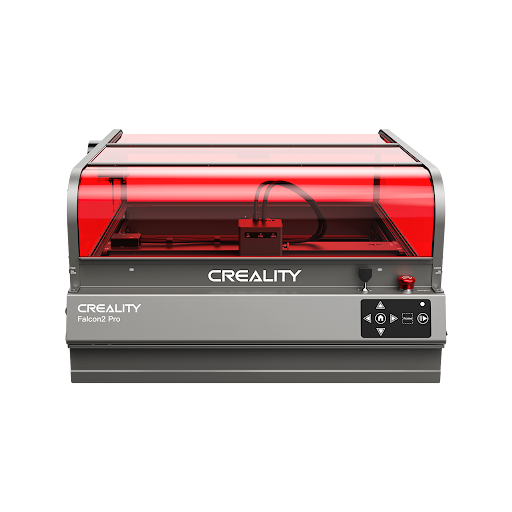

A Laser Cutter is a computer-controlled machine that uses a focused beam of light to cut, engrave, or mark materials with high precision. It can work on materials such as wood, acrylic, leather, paper, coated metal, and some plastics, depending on the laser type. For beginners, diode lasers are usually easier to start with, while CO2 lasers are better for acrylic and thicker cutting.
What Is a Laser Cutter?
A laser cutter is a machine that uses a highly focused laser beam to cut, engrave, or mark materials.
Unlike traditional cutting tools, it does not use a blade or physical pressure. Instead, it directs concentrated light onto the material surface to burn, melt, or vaporize the target area.
This makes laser cutters useful for detailed patterns, clean edges, personalised products, prototypes, signage, craft projects, and small-batch production.
For beginners, the easiest way to understand a laser cutter is this:
It turns a digital design into a physical object by using focused light as the cutting tool.
How Does a Laser Cutting Machine Work?
A laser cutting machine works by generating a powerful beam of light, focusing it through a lens, and moving that beam across the material based on a digital file.
The word “LASER” stands for Light Amplification by Stimulated Emission of Radiation.
Unlike normal light, which spreads in many directions, laser light is concentrated into a narrow and powerful beam.
This concentrated energy allows the machine to cut, engrave, or mark the surface with high accuracy.
| Core part | What it does |
| Laser source | Generates the laser beam |
| Mirrors or optics | Guide the beam toward the cutting head |
| Focusing lens | Concentrates the beam into a tiny spot |
| Cutting head | Directs the beam onto the material |
| Air assist | Blows away smoke, debris, and heat |
| Motion system | Moves the laser along the design path |
| Software | Converts digital designs into machine instructions |
What Are the Main Parts of a Laser Cutter?
Laser Source
The laser source is where the beam is generated.
Different machines use different laser sources, such as diode modules, CO2 laser tubes, or fibre laser systems.
The laser source largely determines what materials the machine can process.
For example, diode lasers are common for wood, leather, paper, and opaque acrylic. CO2 lasers are better for clear acrylic, glass engraving, and thicker organic materials. Fibre lasers are mainly used for metal marking and industrial applications.
Cutting Head
The cutting head directs the laser beam onto the material.
Inside the cutting head, a focusing lens narrows the beam into a very small spot. The smaller and more focused the spot is, the more precise the cutting or engraving can be.
This is why focus adjustment is important. If the laser is not focused correctly, the result may look weak, blurry, burned, or uneven.
Air Assist
Air assist blows air along the laser path while the machine is cutting or engraving.
This helps remove smoke, reduce charring, improve edge quality, and lower the risk of flare-ups.
For wood, leather, cardboard, and plywood, air assist is especially important because these materials can burn easily.
What Are the Different Types of Laser Cutters?
Not all laser cutters work the same way.
The three most common types are diode lasers, CO2 lasers, and fibre lasers.
Each type is better suited to different materials and use cases.
| Laser type | Best for | Main limits | Typical beginner use |
| Diode laser | Wood, leather, paper, cardboard, dark acrylic, coated metal marking | Poor performance on clear acrylic; slower cutting than CO2 | Home crafts, gifts, engraving, small projects |
| CO2 laser | Clear acrylic, plywood, MDF, leather, glass engraving, signage | Higher cost, more maintenance, larger footprint | Small business, workshop, acrylic cutting |
| Fibre laser | Metal marking, tools, jewellery, industrial parts | Not ideal for wood or acrylic cutting | Metal engraving and marking |
For most beginners, a diode laser is the easiest and most affordable starting point.
If your main goal is cutting clear acrylic or producing signs at a faster speed, a CO2 laser is usually the better choice.
If your main focus is metal marking, a fibre or IR laser is more suitable than a standard diode or CO2 machine.
What Can a Laser Cutter Do?
A laser cutter can do more than simply cut materials.
It can also engrave, etch, mark, score, and create detailed designs that would be difficult to achieve with hand tools.
Cutting
Cutting means the laser passes completely through the material.
This is commonly used for wood signs, acrylic shapes, paper crafts, leather pieces, packaging prototypes, architectural models, ornaments, and decorative panels.
Because the laser does not physically touch the material, it can create clean edges and complex shapes without pushing, bending, or cracking the surface.
Engraving
Engraving means the laser removes or burns the top layer of a material to create a visible design.
This is often used for wooden plaques, tumblers, leather wallets, phone cases, signs, coasters, gift boxes, and personalised products.
The laser does not cut all the way through the material. Instead, it creates permanent text, patterns, logos, or images on the surface.
Marking
Marking changes the appearance of the material surface without deep cutting.
It is common on coated metals, anodised aluminium, stainless steel with marking spray, tools, tags, and industrial parts.
For deeper metal engraving, a fibre laser or IR laser is usually the better option.
What Materials Can a Laser Cutter Cut or Engrave?
Material compatibility depends on the laser type, power, wavelength, focus, air assist, and material colour.
A beginner should not assume that every laser can cut every material.
| Material | Diode laser | CO2 laser | Notes |
| Wood | Good | Very good | Great for engraving and cutting thin sheets |
| Plywood | Good for thin sheets | Better for thicker sheets | Glue quality affects cutting results |
| MDF | Possible but smoky | Good with strong extraction | Requires ventilation |
| Leather | Good | Good | Avoid unknown synthetic leather |
| Paper/cardboard | Good | Good | Watch for fire risk |
| Clear acrylic | Poor | Good | CO2 is the better choice |
| Dark acrylic | Often possible | Good | Test settings first |
| Glass | Limited marking | Good for engraving | Usually engraved, not cut |
| Coated metal | Marking possible | Marking possible | Bare metal needs fibre or IR laser |
| PVC/vinyl | Do not cut | Do not cut | Releases toxic and corrosive gas |
What Materials Should You Avoid Cutting?
Some materials are unsafe for laser cutting.
The most important example is PVC or vinyl. These materials can release chlorine gas when cut, which is dangerous to breathe and can damage the machine.
You should also avoid unknown plastics, treated wood, coated materials with unclear chemicals, and synthetic leather unless the material is confirmed to be laser-safe.
| Avoid material | Why it is risky |
| PVC or vinyl | Can release toxic chlorine gas |
| Unknown plastic | May release harmful fumes |
| Treated wood | May contain chemicals or coatings |
| Fibreglass | Can release dangerous dust and fumes |
| Unknown synthetic leather | May contain PVC or unsafe coatings |
Always verify the material before cutting.
A laser cutter should never be used like a normal printer where you simply place any material inside and start the job.
Recommended Beginner Laser Cutters in 2026
If you are new to laser cutting, the best machine depends on your budget, workspace, materials, and safety needs.
For most beginners, an enclosed diode laser is easier to manage. For acrylic and thicker cutting, a small CO2 laser may be a better long-term choice.
Which xTool Laser Cutter Is Best for Beginners?
xTool M1
Why Choose This Product:
xTool M1 is a strong beginner choice for crafters who want a compact, enclosed machine that combines laser engraving with blade cutting.
The xTool M1 is designed for home craft users who want a simple and versatile desktop machine.
It combines a diode laser with a blade cutter, which makes it useful for wood, paper, vinyl scoring, leather, stickers, and small craft projects.
The enclosed design also makes it easier for beginners to control safety, smoke, and reflections compared with open-frame machines.
Its built-in camera helps users place designs more accurately on the material before starting the job.
| xTool M1 detail | Practical meaning |
| Laser type | Diode laser plus blade cutter |
| Power options | 5W or 10W diode options |
| Working area | Around 385 x 300 mm |
| Enclosure | Yes |
| Software | xTool Creative Space |
| Best for | Crafts, engraving, stickers, thin wood, small gifts |
| Watch out for | Lower wattage is slower for thicker cutting |
Is Glowforge Spark Good for Beginners?
Glowforge Spark
Why Choose This Product:
Glowforge Spark is a good option for beginners who want a simple, plug-and-play craft laser with easy web-based software.
Glowforge Spark is built for users who want the easiest possible learning curve.
It is compact, enclosed, and designed for small home projects such as jewellery, small signs, personalised gifts, ornaments, and craft items.
The main advantage is the simple Glowforge software experience. Beginners can upload designs, preview projects, and start cutting or engraving without needing advanced technical setup.
However, it is more limited in power and working area than larger desktop lasers.
| Glowforge Spark detail | Practical meaning |
| Laser type | Diode laser |
| Power | 6W diode |
| Working area | Small craft-size cutting area |
| Enclosure | Yes |
| Software | Glowforge Print web software |
| Best for | Small gifts, jewellery, crafts, simple home projects |
| Watch out for | Requires internet connection and has limited cutting power |
Is SCULPFUN S10 a Good Budget Laser Cutter?
SCULPFUN S10
Why Choose This Product:
SCULPFUN S10 is a solid open-frame diode laser for hobbyists who want good engraving precision and LightBurn support.
The SCULPFUN S10 is better suited to users who are comfortable with a more hands-on setup.
It uses a 10W diode laser and offers a fine laser spot for detailed engraving work.
It is a good fit for wood engraving, leather projects, small signs, and craft materials.
Because it is open-frame, beginners should not treat it as a complete indoor setup. A separate enclosure, ventilation, and proper eye protection are important.
| SCULPFUN S10 detail | Practical meaning |
| Laser type | Open-frame diode laser |
| Power | 10W diode |
| Working area | Around 390 x 400 mm |
| Enclosure | No |
| Software | LightBurn and LaserGRBL |
| Best for | Detailed engraving, wood, leather, hobby projects |
| Watch out for | Needs separate enclosure and extraction |
Is AtomStack Swift Mini Good for Small Projects?
AtomStack Swift Mini
Why Choose This Product:
AtomStack Swift Mini is a compact beginner engraver for users who only need small, lightweight engraving projects.
The AtomStack Swift Mini is designed for portability and simplicity.
It is a small diode laser engraver that works best on compact items such as coasters, wallets, phone cases, tags, and small wooden pieces.
Because of its small working area and lower laser power, it is not the right choice for serious cutting or larger craft production.
However, it can be useful for beginners with very limited space.
| AtomStack Swift Mini detail | Practical meaning |
| Laser type | Compact diode laser |
| Power | 3.5W diode |
| Working area | Around 135 x 145 mm |
| Enclosure | No |
| Software | AtomStack Studio |
| Best for | Small engraving, portable use, simple personalisation |
| Watch out for | Very small work area and limited cutting ability |
Is OMTech K40+ a Good First CO2 Laser?
OMTech K40+
Why Choose This Product:
OMTech K40+ is a beginner-friendly entry point into CO2 laser cutting for users who need acrylic and stronger material cutting performance.
The OMTech K40+ is a compact CO2 laser option for users who want more cutting capability than a diode laser can offer.
It is especially useful for clear acrylic, which diode lasers usually struggle to cut.
Compared with diode lasers, a CO2 machine can be better for acrylic signs, thicker sheet materials, and more serious workshop use.
However, it requires more setup and maintenance. Users need to think about water cooling, extraction, alignment, and workspace planning.
| OMTech K40+ detail | Practical meaning |
| Laser type | CO2 laser |
| Power | Around 40W to 45W CO2 |
| Working area | Around 8 x 12 inches |
| Enclosure | Yes |
| Software | LightBurn compatible |
| Best for | Clear acrylic, wood, signs, stronger cutting |
| Watch out for | Needs cooling, ventilation, and more maintenance |
Is Creality Falcon A1 Pro Good for Beginners?
Why Choose This Product:
Creality Falcon A1 Pro is a strong beginner-friendly option for users who want an enclosed desktop diode laser with better safety control, easier setup, and more room for creative projects.
The Creality Falcon A1 Pro is designed for home users, classrooms, and beginner makers who want a safer and more complete laser engraving workflow.
Its enclosed design helps reduce exposure to laser reflections and makes smoke control easier than a typical open-frame laser machine.
Compared with basic entry-level engravers, Falcon A1 Pro offers a more polished desktop experience for engraving, light cutting, personalised gifts, craft projects, and small creative businesses.
It is suitable for wood, paper, leather, craft materials, and other common laser-safe materials.
| Creality Falcon A1 Pro detail | Practical meaning |
| Laser type | Enclosed diode laser |
| Power | Beginner-friendly diode laser setup |
| Working area | Suitable for desktop engraving and craft projects |
| Enclosure | Yes, safer enclosed design |
| Software | Falcon Design Space, LightBurn, and LaserGRBL |
| Best for | Beginners, classrooms, home engraving, personalised gifts, light cutting |
| Watch out for | Still needs proper ventilation and safe material selection |
How Should Beginners Choose a Laser Cutter?
Beginners should choose a laser cutter based on materials, workspace, safety, and long-term project needs.
If your main projects are small wooden gifts, leather items, paper crafts, or home decoration, a diode laser is usually enough.
If your main projects involve clear acrylic, signage, or thicker cutting, a CO2 laser is usually the better choice.
If you want to engrave metal deeply or mark industrial parts, you should look at fibre or IR laser machines instead.
| User type | Best fit |
| Complete beginner | Enclosed diode laser |
| Home crafter | xTool M1 or Creality Falcon A1 |
| Small engraving business | Enclosed diode laser with air assist |
| Acrylic sign maker | CO2 laser such as OMTech K40+ |
| Precision hobbyist | SCULPFUN S10 with enclosure |
| Small-item engraver | AtomStack Swift Mini |
| Metal marking user | Fibre or IR laser |
What Safety Setup Does a Beginner Need?
Laser safety is one of the most important parts of using a laser cutter.
A laser cutter can produce smoke, fumes, fire risk, and eye hazards.
For beginners, an enclosed machine is usually easier to manage than an open-frame machine.
If you use an open-frame laser, you should add an enclosure, proper ventilation, air assist, and laser-rated eye protection.
| Safety item | Why it matters |
| Enclosure | Helps reduce exposure to laser reflections and smoke |
| Ventilation | Removes smoke, fumes, and fine particles |
| Air assist | Improves cutting and lowers fire risk |
| Honeycomb bed | Supports cleaner cuts and better airflow |
| Correct goggles | Protects against the laser wavelength |
| Fire extinguisher | Important when cutting flammable materials |
| Supervision | Never leave a running laser unattended |
FAQ
Is it hard to learn how to use a laser cutter?
No. Modern beginner laser cutters are much easier to use than older workshop machines.
Software such as LightBurn, xTool Creative Space, Glowforge Print, and Falcon Design Space can help users import designs, arrange layouts, and set cutting or engraving parameters.
Most beginners can learn basic engraving quickly, but safe cutting settings take more practice.
Can a laser cutter cut metal?
It depends on the laser type.
Most diode and CO2 lasers cannot cut bare metal. They may mark coated metals, anodised aluminium, or treated metal surfaces.
For true metal cutting or deeper metal engraving, a fibre laser or industrial laser system is usually required.
Do I need ventilation for a laser cutter?
Yes. Ventilation is necessary for almost every laser cutting setup.
Laser cutting can produce smoke, fumes, odours, and fine particles, especially when working with wood, MDF, leather, acrylic, and paper.
You should vent the exhaust outside or use a suitable fume extraction system.
What is the difference between cutting and engraving?
Cutting means the laser goes completely through the material.
Engraving means the laser removes or burns only the top layer of the surface to create a design, logo, text, or image.
You control the difference by adjusting power, speed, focus, and number of passes.
What is the best laser cutter for beginners?
For most beginners, an enclosed diode laser is the best starting point.
It is easier to manage, safer for home use, and suitable for wood, paper, leather, cardboard, and many craft projects.
Examples include machines like xTool M1, Glowforge Spark, and Creality Falcon A1.
How long does a laser tube or laser module last?
The lifespan depends on the laser type and usage.
Diode laser modules can often last thousands of hours, while CO2 laser tubes usually have a shorter service life and may eventually need replacement.
Good cooling, clean optics, correct settings, and regular maintenance can help extend the life of the machine.
Conclusion
A laser cutter is a powerful digital fabrication tool that uses focused light to cut, engrave, and mark materials.
For beginners, the most important thing is not simply buying the highest wattage machine. The better approach is to choose the right laser type for your materials, workspace, safety needs, and project goals.
Choose a diode laser if you mainly want to engrave wood, leather, paper, and small craft items.
Choose a CO2 laser if you need better acrylic cutting, faster wood cutting, or more serious production capability.
Choose a fibre or IR laser if your main goal is metal marking.
Once you understand how a laser cutter works, what materials it can handle, and what safety setup it needs, it becomes much easier to choose the right machine and start creating reliable projects.